Flip Trickster - Parkour Simul
- 3.7
- Rating
- 10.00M
- Installs
- Free
- Price
 Analysis by App-foxy
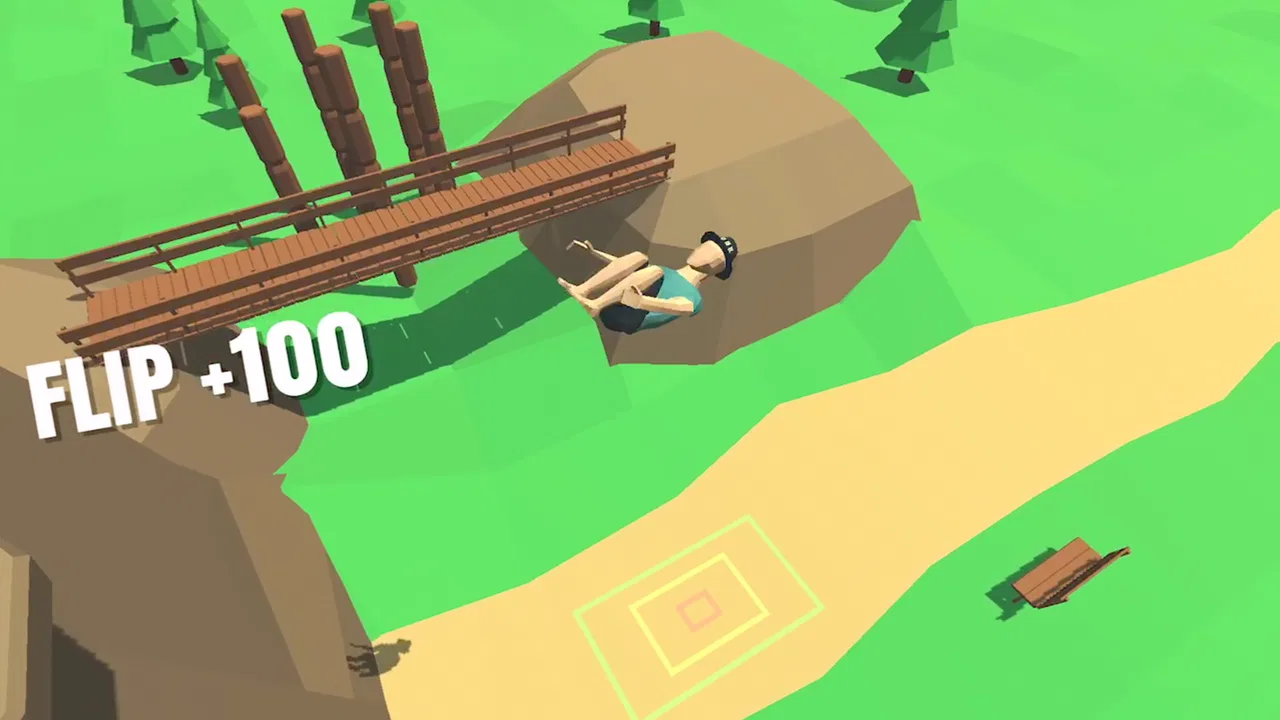
I approached Flip Trickster - Parkour Simul as a quick-play physics game rather than a serious training tool, and that distinction matters from the first minute. Its idea is easy to understand: guide a character through parkour-style flips, land safely, and keep improving your timing. The challenge is not learning a long rulebook; it is learning how small changes in launch direction, rotation, and release timing affect the result.
That makes it an appealing choice when I want something I can open for a short break without committing to a long story or complicated strategy session. At the same time, the simple premise hides a fairly demanding control loop. A failed landing can feel like my mistake, but the game also asks for patience while I work out exactly how its physics respond. If you prefer immediate, predictable controls, this may test your tolerance quickly.
What makes the first few sessions tricky
The main place I found myself getting stuck was not understanding the difference between attempting a trick and setting up a reliable attempt. It is tempting to make a dramatic move immediately, especially when the game presents parkour as the central fantasy. In practice, I had better results when I treated every jump as a small experiment: observe the takeoff, note how much rotation I get, then change only one part of the next attempt.
You May Also Like

 Blood Strike: 2.5 Anniversary
Blood Strike’s Loadouts Turn Every Drop Into a Tactical Gamble
A close look at Blood Strike’s custom loadouts: how fast access to signature weapons reshapes its battle royale rhythm, rewards preparation, and narrows the gap between fights.

 Pandora - Music & Podcasts
Pandora’s Music Is Easy to Start, but Harder to Recover
Pandora’s strength is its low-effort path from a seed to a station. Its weak spot is how much confidence it asks you to place in connection, setup, and quiet recovery.

 8 Ball Pool
 Is Built on Rivalries, Rematches, and Routine
A close look at the rivalries, rematches, shared routines, and unanswered safety questions that turn a quick pool match into a persistent mobile community.

 Samsung Music
’s Quiet Strength Is Playing What You Already Own
Its reach comes less from spectacle than from dependable access to a personal library. That simplicity is both the app’s strongest retention engine and its ceiling.

 AccuWeather: Weather Radar
AccuWeather Review: A Quick, Clear Forecast for Everyday Decisions
For everyday plans, the best forecast is the one you can understand quickly. AccuWeather makes rain timing, radar, and local conditions easy to act on, with a few trade-offs.

 Hill Climb Racing
Why Hill Climb Racing Still Turns Crashes Into One More Run
A tiny car, a bumpy hill and one more upgrade: Hill Climb Racing keeps resurfacing because its simple chaos makes every near-miss feel personal.
More From Our News Desk



This approach is especially useful because a failed landing can encourage random corrections. I would sometimes rotate too far, then overcorrect on the next try, creating a cycle where I learned nothing from either attempt. The more productive habit is to decide whether the problem came from the launch, the timing, or the landing position before trying again. That turns repetition into practice instead of frustration.
The game’s appeal comes from this gradual improvement. A successful landing after several awkward attempts feels earned, particularly when I can see that the result came from a better-timed input rather than luck. However, players who want a relaxed simulation with forgiving outcomes should know that the parkour theme does not mean every stunt will be easy. The compact format still demands concentration.
Another common sticking point is playing while distracted. I can enjoy a short session while waiting for something, but the most precise attempts require more attention than I initially expected. Background conversation, a poor viewing angle, or rushing through retries can make the controls seem worse than they are. If the game suddenly feels inconsistent, I first stop treating it as a reflex-only experience and give each attempt a clear purpose.
Reading a failed attempt instead of repeating it
I found it helpful to separate failures into three broad types. A short landing usually tells me that the approach or launch was not strong enough. A landing that passes the target suggests that I released or rotated too aggressively. A sideways or unstable finish points to timing and alignment rather than distance. These are not formal instructions from the developer; they are practical ways I use the visible result to choose a more sensible next attempt.
This matters because the game can become tiring when every retry feels identical. Even a failed run is useful if I can identify one adjustment. I recommend keeping the change small. Altering several actions at once may produce a success, but I will not know which decision helped, making the next challenge harder to solve.
For a realistic everyday scenario, imagine opening the game during a ten-minute commute or while waiting for an appointment. I would use the first few minutes to make controlled attempts rather than chase a perfect run immediately. If I start missing repeatedly, I would stop after a short sequence and return later. The game works well in that pattern because its individual attempts are easy to understand, but it is less suitable when I need a completely passive distraction.
Setup checks before blaming the game
Before judging the controls, I would check whether the device is running a compatible system. The game supports Android starting with version 6.0, and it is available as a free download. That makes it accessible on a wide range of devices, although compatibility alone does not guarantee that every phone will feel equally comfortable. Screen size, touch response, and general device condition can all affect how precise the experience feels.
I would also begin with a stable setup: hold the phone in the position that feels natural, avoid playing with a cluttered screen, and make sure my fingers are not covering the area where I need to see the character’s movement. These are simple checks, but they remove several sources of confusion. If the game appears to respond late, I would first compare that behavior with other touch-based apps before deciding that the problem belongs to this title.
The current version is 1.11.67, so I would make sure the installed copy is up to date through the normal app store process. I would not jump straight to reinstalling. First, I would close and reopen the game, check available device storage, and restart the phone if other apps are also behaving slowly. Those are safe, general steps that often distinguish an isolated game issue from a broader device problem.
Because the game is free but includes optional in-app purchases ranging from $0.99 to $19.99 per item, I would also review purchase settings before handing the phone to a child. The content rating is Everyone, which makes the game broadly approachable, but an age rating does not replace sensible purchase controls. If I want a child to try it, I would set expectations about purchases before the first session rather than deal with an accidental transaction later.
Choosing the right expectations
The store summary asks whether the player can become the next parkour champion, but I would treat that as a playful challenge rather than a promise of a deep athletic career mode. This is a simulation game built around the satisfaction of executing flips and landings. It is not the same kind of experience as a large open-world parkour game, a structured sports career, or a realistic movement trainer.
That comparison helps me decide whether to install it. If I want quick attempts, simple goals, and a physics-focused challenge, it fits. If I want a long narrative, extensive character customization, or a detailed free-roaming environment, I would look elsewhere. The game’s strength is concentration on the stunt itself, not breadth.
Its audience size suggests that the concept has reached a substantial mobile audience: it has more than ten million installs, around eighty-two thousand ratings, and roughly six and a half thousand written reviews. I mention those figures only as context for its visibility, not as proof that it will suit everyone. The average rating is 3.7, which matches my impression of a game that can be satisfying for the right player but uneven for people who dislike repeated attempts or physics-based uncertainty.
Recovering a session when progress feels stuck
When I stop improving, my first recovery step is to lower the ambition of the next attempt. Instead of trying to complete the most impressive-looking move, I focus on reproducing a stable landing. This gives me a reference point for the controls. Once that feels consistent, I add one more element. The method is slower than random experimentation, but it makes the game easier to understand.
I also avoid changing my play style after every failure. A short run of misses can make me assume that the controls have changed, when I may simply be repeating the same timing error. Taking a brief pause helps more than forcing another attempt immediately. When I return, I try to remember the last attempt that felt close and recreate it before making a new adjustment.
A useful workflow is to divide a session into three stages. I use the opening attempts to observe, the middle attempts to test one correction, and the final attempts to decide whether I have actually improved. If the final stage is still producing random results, I stop rather than turning the session into frustration. This is one of the less obvious strengths of a small simulation game: I can create my own practice structure even when I only have a few minutes.
I would not clear app data or reinstall as a routine response to ordinary difficulty. A hard landing is usually part of the game’s challenge, not evidence that local files are damaged. Reinstalling can also be an unnecessary disruption if the problem is simply unfamiliar timing. I reserve more drastic steps for situations where the app fails to open, repeatedly closes, or behaves differently from other apps on the same device.
Separating control problems from device problems
If the game feels sluggish, I would compare it with another touch-heavy app. If several apps respond slowly, the phone is the more likely source. Closing demanding background apps, restarting the device, and checking storage are reasonable first steps. If only this game is affected, I would then reopen it and check for an available update before considering further action.
Touch accuracy can also be affected by the physical setup. A dirty screen, a thick case edge, or an uncomfortable grip may make a precise gesture feel unreliable. I would clean the screen, try the device without an obstructive case, and play while seated rather than attempting difficult moves while walking. These changes cost nothing and can make the results easier to interpret.
Network conditions are not something I would assume are responsible for every problem. A connection issue may matter for store-related actions or optional purchases, but it does not explain every missed trick. If the character responds normally and I simply land badly, I treat that as gameplay feedback. This distinction prevents unnecessary troubleshooting and keeps the focus on improving timing.
Where this game fits among mobile alternatives
Compared with endless runners, this game gives me more control over the outcome but less of the constant forward motion that makes runners feel effortless. I cannot simply react to obstacles and maintain a rhythm; I need to think about the stunt itself. Compared with traditional sports games, it is narrower and more immediate. There is no need to learn a full team, season, or rule system before I can begin, but I also do not get that broader sense of progression.
Against larger parkour adventures, its advantage is convenience. I can focus on a single flip without navigating a large environment or following a mission. Its trade-off is variety. Players who enjoy discovering locations, combining movement options, and exploring a world may find this format limited. For me, it works best as a focused physics toy with a challenge attached.
The game is also different from purely casual tap games. The presentation may be easy to approach, but the landing process rewards repeated observation. I would recommend it to someone who enjoys improving a small skill over several attempts. I would skip it for a friend who wants guaranteed progress, a strong story, or a calm game that can be played without watching the screen closely.
That distinction is important for families too. The Everyone rating makes it suitable for a broad audience, but younger players may still need help understanding why repeated failures are part of the design. I would present it as a timing challenge rather than a game where every attempt should succeed. Adults who dislike retry-focused gameplay may have the opposite reaction: the simple controls can feel appealing at first, then repetitive once the novelty fades.
My practical verdict after using it
I see this as a worthwhile free simulation game for short, focused sessions. Its best moments come when I stop chasing flashy results and start treating each attempt as information. The satisfaction is not just in seeing a successful flip; it is in recognizing that a small change in timing produced a better landing. That learning curve gives the game more substance than its short store description suggests.
Still, I would not recommend it universally. The 3.7 average rating feels understandable because the same physics that create satisfying successes can also create irritation. If you expect perfectly predictable controls, dislike repeating a challenge, or want a substantial adventure, another category will serve you better. A conventional runner may be better for quick reflex play, while a larger parkour title may be better for exploration and variety.
For anyone trying it, my advice is to start with a clean setup, confirm that the phone meets the Android requirement, and give yourself a few quiet attempts before forming an opinion. Do not judge the game by one failed landing, but do not force yourself through a long session if the control style never becomes enjoyable. The optional purchases are another reason to keep expectations clear, especially on a shared device.
Overall, 7 Minute Games has made a compact parkour simulator that succeeds when I approach it as a practice-based challenge. It is free to start, rated for Everyone, and easy to understand, yet it asks for more patience than the premise might imply. My recommendation is simple: try it if you enjoy learning timing through repetition, but skip it if you want effortless, story-driven mobile entertainment.
FAQs for Flip Trickster - Parkour Simul
01What is Flip Trickster - Parkour Simul?
Flip Trickster - Parkour Simul is a physics-based parkour game focused on performing flips, jumps, and landing tricks safely. You guide a character through obstacle-filled levels, control the timing of each jump, and try to land accurately on platforms or marked areas. The gameplay is easy to understand, but mastering momentum, rotation, and landing position requires practice.
02How do you play Flip Trickster - Parkour Simul?
The main objective is to launch your character, perform one or more flips, and land without falling. Players generally use simple touch controls to adjust the jump and rotation while the character is in the air. Success depends on releasing or changing the controls at the right moment. Early levels help explain the mechanics, but later challenges demand better timing and more precise control.
03Is Flip Trickster - Parkour Simul free to download and play?
Flip Trickster - Parkour Simul can be downloaded and played without an upfront purchase, although the free version may include advertising and optional in-app purchases. These purchases can provide cosmetic content, remove advertisements, or unlock additional conveniences, depending on the version available in your region. It is worth checking the store listing before downloading for the latest pricing and restrictions.
04Does Flip Trickster - Parkour Simul require an internet connection?
The core parkour and flipping gameplay is generally designed to be playable offline, which makes it suitable for short sessions while traveling or when a connection is unavailable. However, internet access may still be needed for advertisements, downloading certain content, restoring purchases, or accessing online features. Availability can vary by device and app version, so offline behavior may not be identical for every player.
05Is Flip Trickster - Parkour Simul suitable for children and casual players?
The game is easy to start because its controls are simple and the objective is immediately clear, making it approachable for casual players. Nevertheless, the physics can be challenging, and repeated failed landings may require patience. Parents should also review advertising and in-app purchase settings, since the game may contain promotional content. The action is cartoon-like rather than realistic, with no graphic violence.
Pros
- Responsive controls make flips and landings feel satisfying.
- Wide variety of levels keeps the challenge fresh.
- Physics-based movement creates entertaining
- unpredictable moments.
- Replay feature helps you review and improve failed attempts.
- Runs well on many devices with simple
- lightweight gameplay.
Cons
- Some levels rely heavily on trial and error.
- Ads can interrupt the experience between attempts.
- Precision landings may feel frustrating on smaller screens.
- Progress can become repetitive after extended play.
- Several customization options require in-game purchases.

Flip Trickster - Parkour Simul
Gallery